Your comments
Thank you for your answer.
I checked out the Standard window and the "My History" view as you suggested. It seems that I only see my last checked out branches and I seem unable to filter this view. So, this does not work for the use-case described above (Filtering for branches in different sub-folders).
Nevertheless I also checked the "All branches + Tags" view. There, filtering is possible and works with regex expressions (this would indeed satisfy the "Filtering for branches in different sub-folders" use-cases). Also merging a filtered branch into my current local branch is possible.
But there are some (breaking) drawbacks:
- The filter resets everytime SmartGit is closed and opened again. Even the "interpret the search pattern as regex" setting is not safed and has to be clicked again every time. I see this as a no-go, espacially with regex filter patterns.
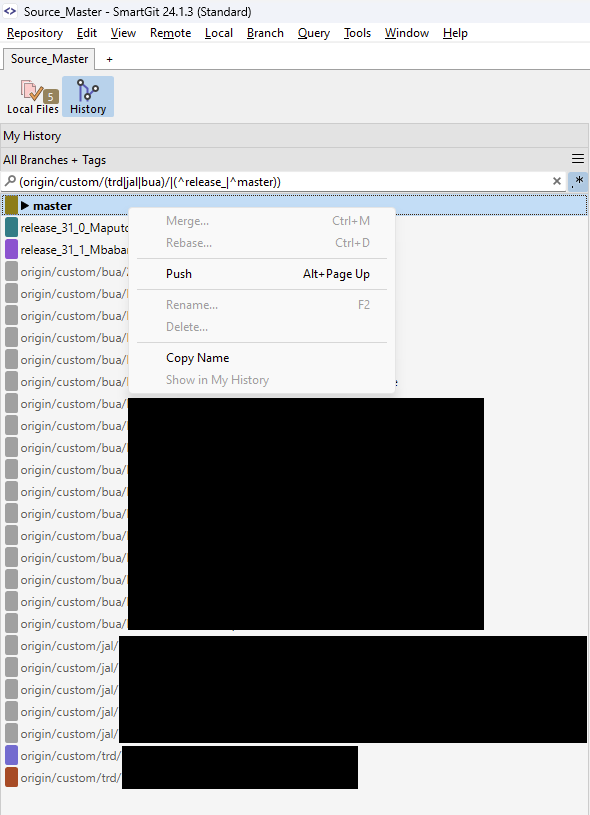
- For some reason im unable to reset my current checked out branch in the context menu nor can I reveal its origin in the graph on the side (See picture below).
- It seems that in the "History" view staging/commiting/resetting is not possible. Also the current changes are not visible. It seems one has to switch back into "Local Files" view for this (But even there I'm unable to reset my current branch. Or at least I didn't find out how to achieve this).
Conclusion:
I do like the filtering in the "All branches + Tags" view (Big thumbs up here!). That is exactly what I have in mind for the "filtered branch-views" request.
But the fact that the filter is not saved, I am not able to reset my current branch, see the local changes and reveal the origin of my checked out branch prevents me from using this approach.
Customer support service by UserEcho


This is certainly a positive change (although not the one asked for in this feature request).