
0
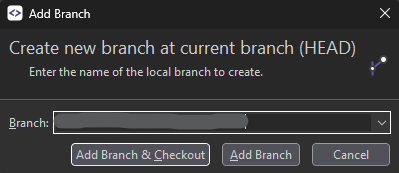
[Add branch dialog] input scroll to remember entered value as one of items to scroll to
There's an option to scroll mouse wheel while [Branch:] input is focused. It will bring items from the dropdown one-by-one
The issue is that it replaces the entered value unrecoverably. Whatever you've written there will be lost and replaced with dropdown item you've scrolled to. For me it is usually an unintended action while pressing the [Add Branch & Checkout] button: I can accidentially trigger mosue wheel and it will do what I didn't want.
Solution: we may cache current value as one of the dropdown items, so when yopu scroll back it is reverted to whatever has been input there (the edited/new value). Thus we'll get an option to have what we had and use the scroll feature.
Customer support service by UserEcho


I think that's how a combobox works on Windows.
It is more about improving what is done.
I'm totally fine with what it is now. But when it comes to a handwritten branch name, which then gets replaced with some other value because you simply touched your mouse wheel and it did scrolled - the issue becomes more than ennoying...
I already have a habbit to hit Ctrl+A Ctrl+C before completing the input, but it becomes more of a maniac kind...