
0
Please make SmartGit smart here too: Dialog: Add GitHub Account
Hello
With SmartGit, it’s unfortunately a recurring disappointment that SmartGit doesn’t guide users smartly, for example, this dialog:
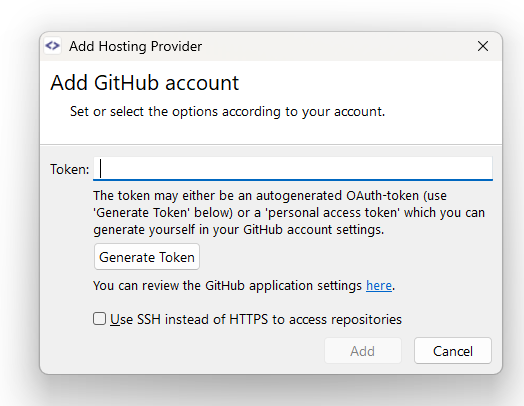
- Of course, a user can have multiple GitHub accounts.
- So why doesn’t this dialog explicitly mention which account is being referred to?
Is the user supposed to assume 🥴 that SmartGit is referring to the repository that is currently active?
Well, in reality, a GitLab (not GitHub) repository is active in SnartGit 😉
But that’s true, too, of course:
Thank you so much for this app, which is often smart!
Thanks a lot, kind regards,
Thomas
Customer support service by UserEcho


Hello
btw.: Unfortunately, this dialog isn’t smart either:
A smart solution would:
But, of course: If the repository in the dialog above is a GitLab repository and SmartGit has multiple GitLab accounts, the link will naturally not lead to a list of all GitLab credentials, but specifically to the credentials currently assigned to the repository in the dialog. That is smart 😍
Thanks a lot, kind regards,
Thomas