
In merging state, list conflicted files at top
When merging a branch which leads to conflicts, I often run into the problem that the conflicted files are spread across hundreds of rows in the Files view:
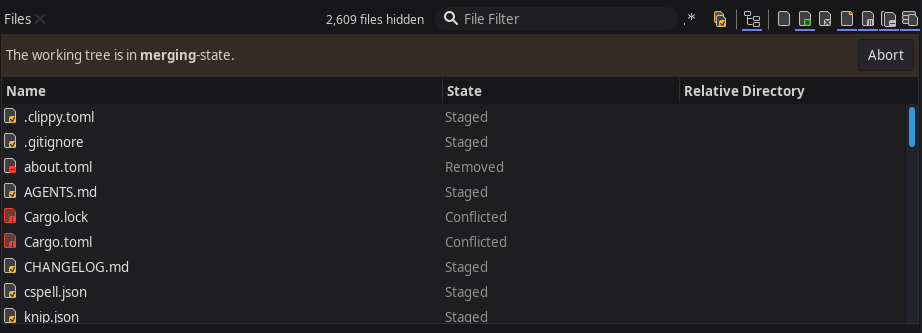
It is not practical at all to scroll though hundreds of files just to find the 5 conflicted files you need to resolve manually. The only practical option seems to be to sort the list by the State column, to have all conflicted files at the top.
That works fine, but after the merging state is left, the new sort order remains, and I have to change the sort order again to get the list sorted by relative directory & file name (i.e. a sorting order which feels comfortable for me).
As this is happening regularly, I'm constantly changing the sort order, which is annoying. I wish the sort order in the merging state is memorized separately from the sort order of the normal state. So every time I run into the merging state, files will be sorted by State automatically, and after leaving the merging state, sorting automatically changes back to Relative Directory & File Name (i.e. the sort order of *before* the merging state).
This would be a big quality of life improvement :-)
Customer support service by UserEcho


The sorting is configurable by the user. Please sort by the State column.
I know, that's what I do already. Seems you didn't read my comment fully.
TL;DR The sort configuration of the Files table should be memorized for each state separately, so we can configure different sort columns for merging state and for normal state.