Share your ideas on how to improve SmartGit!
This is no support platform! To report bugs or request support, please contact us directly. If in doubt ask us.
First search for a similar request and add your votes or comments there.
Take the time to describe your request as precisely as possible, so users will understand what you want. Please note that we appreciate your time and input, but we don't give any guarantees that a certain feature will be implemented. Usually, a minimum requirement is a sufficient number of votes. Hence, please don't comment like "when will this be implemented", but vote instead.
Follow the stackoverflow.com writing guidelines.
Thank you for your help!

Compare: check for modified file when saving
SmartGit's diff tool is great, and I'll often use it to review and adjust changes before committing. However, SmartGit's editor has some significant limitations, and I'll do much of my work using BBEdit.
At times I'll have the same file open in both SmartGit and BBEdit. If I make a change with SmartGit, and then try to save a different change with BBEdit, BBEdit will warn me that the disk file has been changed. If I've changed a file with BBEdit, though, and then try to save a change with SmartGit, it'll happily tromp over the changed file.
Suggestion: when you're about to save a file, make sure it hasn't changed since it was read. If it has, show a warning.

Worktrees: manage them automatically in Repositories view [SG-13538]
When opening a repository (or an worktree), SmartGit should detect all related worktrees and display them as separate "repositories" in the Repositories view. UI might be similar as for submodules.

File Compare: option to Export as Patch
Today it only has the option `Export as HTML`:
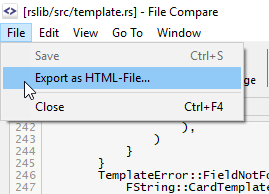
The option Export as Patch, would create a diff file from the current file as:
```
From .... Mon Sep 17 00:00:00 2001
From: .....
Date: Sat, 29 Feb 2020 16:29:30 -0300
---
rslib/src/template.rs | 6 +++++-
1 file changed, 5 insertions(+), 1 deletion(-)
diff --git a/rslib/src/template.rs b/rslib/src/template.rs
index cf38bce2..10a1b081 100644
--- a/rslib/src/template.rs
+++ b/rslib/src/template.rs
@@ -276,6 +276,7 @@ pub fn without_legacy_template_directives(text: &str) -> Cow {
impl ParsedTemplate<'_> {
/// true if provided fields are sufficient to render the template
pub fn renders_with_fields(&self, nonempty_fields: &HashSet<&str>) -> bool {
+ println!("nonempty_fields '{:?}'", nonempty_fields);
!template_is_empty(nonempty_fields, &self.0)
}
}
...
```

Stash: add stash index next to the name
Use case: If you use git stash list to search a particular stash, it is shown like stash@{24}: On brach: Stash name, and you currently have to manually count 24 stashes in SmartGit's list.
Say which submodule is on a detached head state
I had selected all files o my working tree and I hit the commit button. Then Smartgit said this:
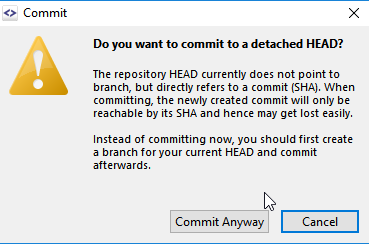
But I have no idea which one is the submodule which is on a detached head state.
Smartgit could at least inform from where it is coming from.

Gitea / Gogs
Automatically save and apply stash when rebasing
It would be nice if SmartGit would automatically stash possible files in the working tree when you start to modify, split or manually rebase some commits, and then apply it back after git rebase finishes. Similar to how it does on a checkout when it detects possible conflicts.
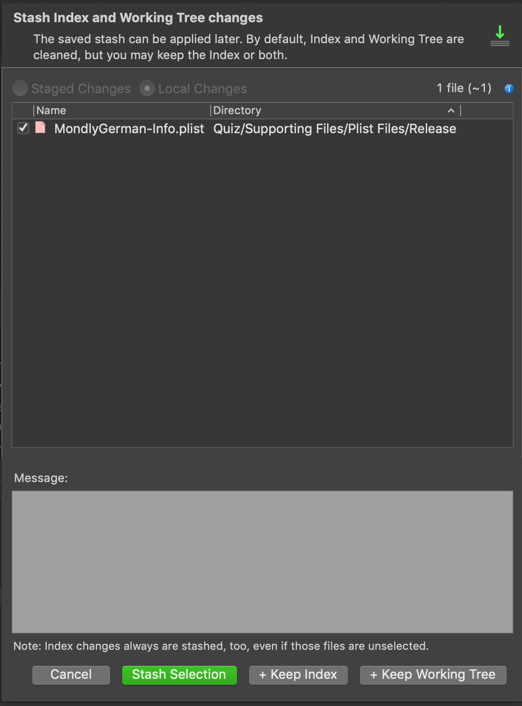
Show the files to be staged, similar to the Commit window
This way, it's way easier to notice that staged files are automatically stashed for selective stashing, and you can also double click each file to view its content beforehand. So something along the lines of:

Open a version of a file from a commit without saving it first
When viewing a commit, it would be nice to be able to either:
a) right click on the file in the Files tab and select "View Before" or "View Before", or
b) select "View" from the appropriate Changes window down the bottom of the screen
and it would save the file to the %TEMP% folder and open my editor for it.
At the moment my options are either copy the text from the Changes window and paste to my editor (but since the new unsaved file doesn't have an extension, it doesn't get syntax highlighting), or save the file somewhere and then open it in my editor.
I just want to view the file - not revert it, and I don't care where it gets saved.

Commit authoring: support for GitHub's "Co-Authored-By"
When merging a pull request in GitHub, both the PR creator and the committer appears in the new commit ("By" = PR creator, and "committed by" = the one that merged the PR)
It happens that I need to commit something that was made by another developer, so I would love to be able to do exactly the same : set the "By" to the real author of the code, and my name only appearing as the committer.
Also, when working in pair, it would be nice to be able to add the other developer as author...
Would be perfect to be able to pick the name/email from the log (people that did already commit).
May the "Co-Authored-By" be useful for this ?
Customer support service by UserEcho


