Your comments
The devil is in the detail, e.g.: what line separator to enter when the user presses <enter>, especially if the file is empty. How to handle text copy-pasted from some other source?
You may put this command sequence into a shell script and add an SmartGit tool to this shell script.
What exactly do you mean then with "execution of a command itself"? What command you like to invoke?
No, it is not possible to detect reliable in what branch the commit was created. The merge comments might be a clue for the one who reads the log. The primary parent for branches also might help. But I have seen more complex repositories (using excessive merging for feature branches) where it was impossible to determine the branch, especially because there was none any more.
Already exists in the preferences, Tools page.
This would be useless for non-trivial repositories. One of ours is a quite clean one, but we have 4 branches developed in parallel. All get merged back and forth to the master. Hence, every commit of some older commits would show the same branches.
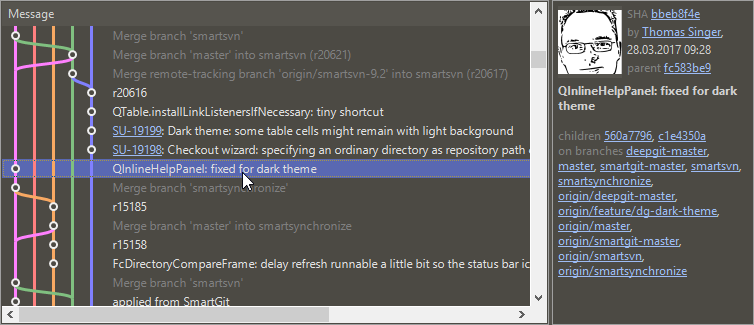
This won't work. The blue line also is part of v4.93.xx. Also, we only take colors from a quite limited pool, but there can be dozens of branches.
In this simple example this might work, but for others it might fail. I line or a commit does NOT belong to a branch in Git. A Git branch is nothing else than a named pointer to a certain commit.
Imagine you move the mouse over the blue line of the 3rd row from the bottom. It belongs to branch (origin/)v4.93.xx and (origin/)creatique_1132.
Please see your thread in the mailing list: https://groups.google.com/forum/#!topic/smartgit/NQIrvPVJFFw
Customer support service by UserEcho


SmartGit should not be a bad editor and support/write mixed line separators. If mixed line separators were detected, it will reject editing.