Your comments
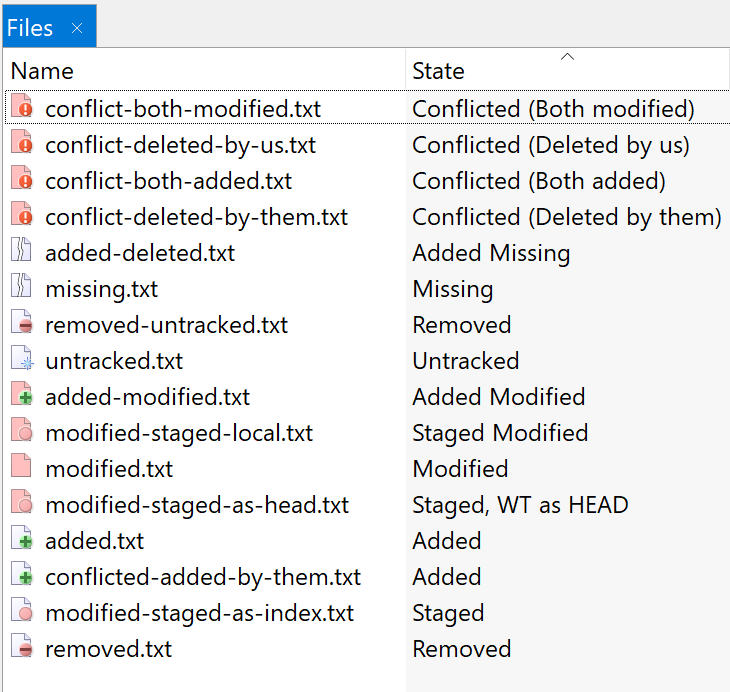
Well, currently, we use the light-red color for modifications, the green (+) for addition and the light red (-) for removal. Changing something like this at this state of the application would mean that a VERY large number of users would have to learn new colors which could frustrate a major part of them.
Where exactly do you click and why do you consider this to be intuitive?
"On the bottom Master is green, but changes to red at the top." This statement is wrong from the Git perspective, because master only is pointing now at the commit q. The commits a-h don't have anything todo with the named pointer "master". They could have been created with any branch, e.g. foobar, - this information is not stored in Git.
Are you using Plastic SCM? In that case, could you please create a screenshot of Plastic SCM for Git's repository (https://github.com/git/git) and compare with the one from SmartGit? Thanks in advance.
Thanks for the link. Just curious, why do you think it to be a good example? Taking the topmost screenshot, I only see 14 commits though it uses nearly the full screen width. When I would think that for our repository, I would miss the forest for the trees (a German saying).
I'm not sure I understand what you want. What do you mean with "just like I can see all branches" - where do you can see all branches for a branch?
So speaking in Git terminology you want to get a list of all tags that point to some commit of the current branch's history?
Could you please describe in more details what exactly you mean? Note, that branches and tags in Git are just named pointers to commits. They are not part of commits.
Customer support service by UserEcho


There only is whitespace below the last item in this tree control. If the repository has grown out of the starting state, there usually is no such whitespace.