Share your ideas on how to improve SmartGit!
This is no support platform! To report bugs or request support, please contact us directly. If in doubt ask us.
First search for a similar request and add your votes or comments there.
Take the time to describe your request as precisely as possible, so users will understand what you want. Please note that we appreciate your time and input, but we don't give any guarantees that a certain feature will be implemented. Usually, a minimum requirement is a sufficient number of votes. Hence, please don't comment like "when will this be implemented", but vote instead.
Follow the stackoverflow.com writing guidelines.
Thank you for your help!

Push To: Show branch name when pushing
When you push a branch to a remote, the Push To dialog does not show the branch name. I'd love to have that so when I'm using the keyboard I'm sure I'm not pushing the wrong branch.

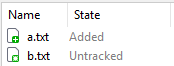
Better distinguishable icons for "untracked" and "added" states
The new icons in SmartGit 26 for "untracked" and "added" states are very similar in color and shape, which makes it hard to distinguish between those states. This is especially an issue in the working tree view, where both icons are mixed.
It would be better if the untracked icon had a different color than green (it previously was blue in SmartGit 25), since this would help to see the state at once without paying attention to the exact shade of green or the additional white pixels between the star and plus icon.

Standard Window: allow Pull with local changes
With the new Standard window, pull is rejected if working tree contains local changes, error message is:
"The working tree contains local changes.: Commit or stash local changes before pulling."
This behavior is different in log or working tree windows, a pop up allowing to choose some options shows up.
This makes standard window unusable for me.

Monorepo support [SG-14535]
Support for possibly huge "mono repositories", by:
- offering a "shallow" clone of the repository
- selectively fetching projects from the repository, using Git's "sparse checkout" feature and "partial clone" feature
- limiting Log graph (and dependent views) to such a fetched project
Support should be implemented in a subtle way to not complicate the GUI for the majority of "plain" repository users.
Related topics:
Please comment on this topic about your monorepo size:
- Number of projects
- Number of commits overall (
git rev-list --all --count) - Number of files in HEAD overall (
git ls-tree -r HEAD | grep -c "")

Branch rename should ask whether to rename the tracked one too or not
- Have a branch named A
- Push it to origin
- It starts tracking origin/A
- Rename the local one to B
- Delete the remote origin/A
- Push the local B to origin
It gets pushed to origin/A.
Stash should work similar to Commit - the selection should define whether to stash all or just the selection
Not selecting any file, both cmd + k and cmd + s commits, respectively stashes all the files in the working tree.
Selecting one or more files from the working tree, cmd + k commits them while cmd + s stashes all the files, in which case the selection is completely ignored.
This is not consistent and, at least for me, very unintuitive. A lot of times I selected some files, hit cmd + s, and pressed enter, only to see that all the files were stashes instead.

Great product continues to improve, and the Preview releases are habitual!
SmartGit continues to improve at a good pace and the Preview releases are a great way to try the improvements. I've become so used to regular Preview releases that I'm almost sad when a new build isn't available to try! ;-)
For 18.1 Preview, the "Reworked Compare" feature is my personal fav as I'm diffing all the time and this change helps automatically narrow to what's truly changed vs me manually hunting in a highlighted block for what changed (slow and painful!).
Thanks guys!
Clicking the Pull button should behave as the Push button does - immediately do the pull
Clicking the Pull button pops up a dialog window of the options, which I almost never use, and requires user to press Enter or click. If I need to do pull options, the button's drop down menu has them.
This is also true of the context menu's Pull... and Ctrl-P shortcut, but those work as is.
Clicking the Push button immediately does the push. If I need to adjust the push, the button's drop down menu has it.

Output window: add date and time stamps for events
To aid in diagnosing merge issues and checking when events occurred add the date and time stamp to each node in the output tab

Changes view: allow staging/unstaging in "compact changes display", too
The rows can be reverted only in standard changes view, not in compact one. I don't know, if it is because of any technical
Customer support service by UserEcho